# Description
## Manual Redaction:
- ### Text Selection-based redaction:
-

- Users can now redact currently selected text by selecting the text
then clicking `ctrl + s` shortcut or by pressing on **apply/save/disk
icon** in the toolbar.
- Users can delete/cancel the redacted area by clicking on the box
containing the text, then clicking on `delete/trash` icon or by using
the shortcut `delete`.
- Users can customize the color of the redacted area/text (after the
redaction was applied) by simply clicking on the box containing the
text/area then clicking on the `color palette` icon and choosing the
color they want.
- Users can choose to select the color of redaction before redacting
text or applying changes (this only affects newly created redaction
areas, to change the color of an existing one; check the previous bullet
point).
- ### Draw/Area-based redaction:
-

- Users can now redact an area in the page by selecting the then
clicking `ctrl + s` shortcut or by pressing on **apply/save/disk icon**
in the toolbar.
- Users can delete/cancel the redacted area by clicking on the drawn
box, then clicking on `delete/trash` icon or by using the shortcut
`delete` (requires temporarily turning off drawing mode).
- Users can customize the color of the redacted area (after the
redaction was applied) by simply clicking on the box containing the area
then clicking on the `color palette` icon and choosing the color they
want.
- Users can choose to select the color of redaction before drawing the
box or applying changes (this only affects newly created redaction
areas, to change the color of an existing one; check the previous bullet
point).
- ### Page-based redaction:
-
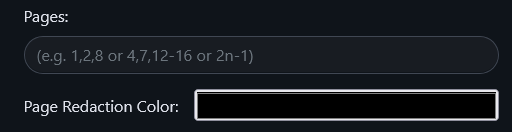
- Users can now redact **ENTIRE** pages by specifying the page
number(s), range(s) or functions.
- Users can customize the color of page-based redaction (doesn't affect
text-based nor draw-based redactions).
### Redaction modes:
There are three modes of redaction/operation currently supported
- Text Selection-based redaction (TEXT)
- Draw/Area-based redaction (DRAWING)
- None - by simply not choosing any of the above modes (NONE).
## How to use:
- **Text Selection-based redaction:** click on this icon in the toolbar

to enable `text-selection redaction mode` then select the text you want
to redact then press `ctrl + s` or click on the disk/save icon
.
- **Draw/Area-based redaction:** click on this icon in the toolbar

to enable `draw/area-based redaction` then `left mouse click (LMB)` on
the starting point of the rectangle, then once you are satisfied with
the rectangle's placement/dimensions then `left mouse click (LMB)` again
to apply the redaction.
- **Example:** `Left mouse click (LMB)` then move mouse to the right
then bottom then `Left mouse click (LMB)`.
- Note: Red box/rectangle borders indicate that you have not yet saved
(you need to left click on the page to save)
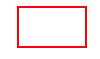
once saved the borders will become green

(they also become clickable/hover-able when drawing mode is off).
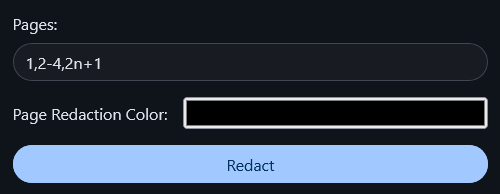
- **Page-based redactions:**: Insert the page number(s), range(s) and/or
functions (separated by `,`) then select your preferred color and click
on `Redact` to submit.
- **Color Customizations:**
- You can change the redaction color for new redactions by clicking on
this icon in the toolbar
.
- You can change the redaction color for existing redactions by hovering
over the redaction box then clicking on it (`Left mouse click LMB`) then
clicking on color palette (highlighted in red in the picture)

then select your preferred color.
- **Deletions:**
- You can delete a redacted area by hovering over the redaction box then
clicking on it (`Left mouse click LMB`) then clicking on the trash icon
(highlighted in red in the picture)
.
## Card in the home page:
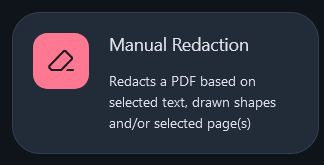
Closes#465
## Checklist
- [x] I have read the [Contribution
Guidelines](https://github.com/Stirling-Tools/Stirling-PDF/blob/main/CONTRIBUTING.md)
- [x] I have performed a self-review of my own code
- [x] I have attached images of the change if it is UI based
- [ ] I have commented my code, particularly in hard-to-understand areas
- [ ] If my code has heavily changed functionality I have updated
relevant docs on [Stirling-PDFs doc
repo](https://github.com/Stirling-Tools/Stirling-Tools.github.io/blob/main/docs/)
- [ ] My changes generate no new warnings
- [ ] I have read the section [Add New Translation
Tags](https://github.com/Stirling-Tools/Stirling-PDF/blob/main/HowToAddNewLanguage.md#add-new-translation-tags)
(for new translation tags only)
---------
Co-authored-by: Anthony Stirling <[email protected]>
# Description

Enhance NFunction sanitization and support advanced functions:
- Start page counting from 1 rather than 0 as PDFs are one based from
the user's perspective, thus functions results would be affected by
starting with "0" rather than "1".
- Ignore out of bound results rather than stopping iterations to work
with functions such as (n - 4) when page count is 10 as we would get
positive values when n > 4.
- Remove spaces to support expressions such as 2n + 1 rather just 2n+1.
- Support advanced functions as follows:
- Support expressions such as follows 5(n-1), n(n-1), expressions
followed by opening rounded without '*' operator.
- Support expressions such as follows (n-1)5, (n-1)n, expressions
preceded closing rounded without '*' operator.
- Support consecutive "n" expressions, examples: nnn, 2nn, nn*3, nnnn.

Closes #(issue_number)

## Checklist

- [x] I have read the [Contribution
Guidelines](https://github.com/Stirling-Tools/Stirling-PDF/blob/main/CONTRIBUTING.md)
- [x] I have performed a self-review of my own code
- [ ] I have attached images of the change if it is UI based
- [x] I have commented my code, particularly in hard-to-understand areas
- [ ] If my code has heavily changed functionality I have updated
relevant docs on [Stirling-PDFs doc
repo](https://github.com/Stirling-Tools/Stirling-Tools.github.io/blob/main/docs/)
- [x] My changes generate no new warnings
- [ ] I have read the section [Add New Translation
Tags](https://github.com/Stirling-Tools/Stirling-PDF/blob/main/HowToAddNewLanguage.md#add-new-translation-tags)
(for new translation tags only)
Show permissions as a separate tab

- Move permissions code into a separate for better readability and maintainability.
- Separate `Permissions` node from `Encryption` so that it would be displayed in the frontend as a separate tab.
- Use more user friendly permission labels such as replacing `canModify` with `Modifying` and values such as `Allowed` and `Not Allowed` instead of `true`, `false`.
- Show permissions regardless of the encryption state.
The code snippet `input[type=file]{ display: none;}` was unintentionally hiding the upload button, to fix this, it was changed to only target input within `.input-container`
* Fix deserialization failure from String to Map

Fix deserialization failure from String to Map that caused the following exception:
Resolved [org.springframework.web.bind.MethodArgumentNotValidException: Validation failed for argument [0] in public org.springframework.http.ResponseEntity<byte[]> stirling.software.SPDF.controller.api.misc.MetadataController.metadata(stirling.software.SPDF.model.api.misc.MetadataRequest) throws java.io.IOException: [Field error in object 'metadataRequest' on field 'allRequestParams': rejected value [{"customKey1" : "YourCustomKey", "customKeyValue1", "YourCustomValue"}]; codes [typeMismatch.metadataRequest.allRequestParams,typeMismatch.allRequestParams,typeMismatch.java.util.Map,typeMismatch];

* Fix form binding for dynamic Map entries in Change Metadata

- Implemented support for dynamic key-value inputs in Change Metadata form using proper `name` attributes for Map (`allRequestParams`) binding.
- Fix form binding for dynamic Map (`allRequestParams`) entries in Change Metadata as the `allRequestParams` (Map name) was being sent as an empty map.
* Add separate drag and drop area for file choosers

 - Add separate drag and drop area for file choosers

### Why?
Previously, when there were multiple file choosers in the same page, if you attempted to drag and drop any files, they would be added to both file choosers as it was designed at first to handle 1 file chooser present, now that we have multiple ones, it is necessary to adapt our design to match the changing functionality.

### Can you not preserve the old overlay when there's only one file chooser present?
Yes, we can, but imagine as a user, you try to drag and drop a file in one page and the fields turn into drag and drop areas then you go to another page and try to drag and drop again but you encounter the old overlay instead, as a user you might get confused and ask yourself "What changed?" or if a user is telling another user the steps to drag and drop files and he didn't know about this case, then it would still be confusing, thus consistency is preferred in this case.

* Update file chooser UI

* Add support for listing and removing selected files and their file icons

- Selected files are listed below the file chooser in a selected files container.
- Users can now remove uploaded/selected files.
- Hide selected files container/box unless there are files selected/uploaded.
- Add separate overlay for each drag & drop area.

## FAQ:
- Why did you assign a unique id to each file? isn't the filename enough?
= Because a user might upload multiple files with the same name, if the user wanted to remove one of them, how would we differentiate between them? we won't be able to unless we assign an identifier, you might argue "we remove based on the filename and size", then what if the user uploaded the same file more than once (intentionally), then we would accidentally remove all the files even though that is not what the user wanted, so going with unique ID approach would prevent this issue/problem from occurring in the first place.

* Rename remove-file css class to remove-selected-file

- Rename remove-file css class to remove-selected-file to avoid css conflict with remove-file in merge.css

* Use input element to dispatch event on file removal

Use the correct element to dispatch "file-input-change" (input element is the correct one).

* Adapt file chooser UI to themes

- Adapt file chooser UI to themes by adjusting their font colors and background colors.
- Make text more visible in overlay by increasing the font size by 0.1rem and setting font weight to 550.

* Remove extra overlay border

- Removing overlay's border as it is unnecessary and only causing a double border issue on the file input container.

* Remove Browse button, highlight file chooser and make it clickable

- Remove browse button.
- Make the entire file chooser container clickable.
- Add glowing effect on hover for file chooser.
- Change color of file chooser on hover.

* Replace crypto.randomUUID() with UUID.uuidv4()

- Replace crypto.randomUUID() with UUID.uuidv4() as crypto.randomUUID() is only supported in secured contexts such as localhost 127.0.0.1 and over HTTPS

* Fix merge file removal not being reflected in file chooser

- Files removed from the list in merge page would now be reflected in the file chooser's container.

* Make inputElement optional in removeFileById

- Make inputElement optional in removeFileById, this way we could control changing inputElements files.

* Add translation support to file chooser

---------

Co-authored-by: Anthony Stirling <[email protected]>
Fix fileInput.js adding event listeners more than once

- Fix a bug that caused fileInput.js to add event listeners more than once per HTML file as it's included in fileSelector fragment in fragments/common.html thus it's being loaded N times where N is the number of file selectors / custom file chooser / file input elements per HTML file, which resulted in each event actions being executed N times as well, which was prevalent in drag and drop operations such as dragging and dropping a file called y.png, it would be duplicated N times (as in /sign path).
Fix a bug that allowed multiple files to be dropped onto a single-file input element

- Fix a bug that allowed multiple files to be dropped onto a single-file input element by accepting only the first file.
- Fix Array.from syntax in nonmultiple file upload as Array.from(<non-array or string>) returns an empty array which is the case when a file is selected from an input element (when multiple attribute isn't supported) which can be found in Array.from(element.files[0]) -> results in an empty array.
* Implement Command class for Command Pattern

Created a base `Command` class to implement the **Command Pattern**. This class provides a skeletal implementation for `execute`, `undo`, and `redo` methods.

**Note:** This class is intended to be subclassed and not instantiated directly.

* Add undo/redo stacks and operations

* Use rotate element command to perform execute/undo/redo operations

* Handle commands executed through events
- Add "command-execution" event listener to execute commands that are not invoked from the same class while adding the command to the undo stack and clearing the redo stack.

* Add and use rotate all command to rotate/redo/undo all elements

* Use command pattern to delete pages

* Use command pattern for page selection

* Use command pattern to move pages up and down

* Use command pattern to remove selected pages

* Use command pattern to perform the splitting operation

* Add undo/redo functionality with filename input exclusion

- Implement undo (Ctrl+Z) and redo (Ctrl+Y) functionality.
- Prevent undo/redo actions when the filename input field is focused.
- Ensures proper handling of undo/redo actions without interfering with text editing.

* Introduce UndoManager for managing undo/redo operations

 - Encapsulate undo/redo stacks and operations within UndoManager.
- Simplify handling of undo/redo functionality through a dedicated manager.

* Call execute on splitAllCommand

- Fix a bug that caused split all functionality to not work as execute() wasn't called on splitAllCommand

* Add undo/redo buttons to multi tool

- Add undo/redo buttons to multi tool
- Dispatch an event upon state change (such as changes in the undo/redo stacks) to update the UI accordingly.

* Add undo/redo to translations

* Replace hard-coded "Undo"/"Redo" with translation keys in multi tool

---------

Co-authored-by: Anthony Stirling <[email protected]>
* Fix input files being overwritten by newly uploaded files

- Fix a bug that caused existing selected/uploaded files to be overwritten when a new input file is uploaded through input element.
- Add source property to change event to differentiate between uploaded files using input element and drag/drop uploads to avoid processing drag/drop files more than once, thus avoiding file duplication (file duplication resulting from copying drop/drop files to input files on each 'change' event).

* Dispatch and use file-input-change instead of change event for merging

- Dispatch "file-input-change" event after each "change" event in file upload, to notify other functions/components relying on the files provided by the \<input\> element.
- Use "file-input-change" instead of "change" event to display the latest version of uploaded files.

# FAQ:
- Why use "file-input-change" instead of "change" in merge.js?
= "change" event is automatically triggered when a file is uploaded through \<input\> element which would replace all the existing selected/uploaded files including the drag/drop files.

## Example:
Let's say that the user wants to upload/select the x.pdf, y.pdf and z.pdf all together:

- user selects "x.pdf" -> file selected successfully.
= selected files: x.pdf

- user drags and drops "y.pdf" -> file dropped successfully
= selected files: x.pdf, y.pdf

- user selects again using \<input\> "z.pdf" -> file selected succesfully overwriting selected files.
= selected files: z.pdf
* Add Tabula dependency and exclude slf4j-simple

- Add tabula-java dependency to extract tables into CSV.
- Exclude slf4j-simple due to Logback

* Add a flexible CSVWriter

- Add FlexibleCSVWriter which extends CSVWriter to pass a custom CSVFormat, as CSVWriter's parameterized constructor (that allows changing CSVFormat) is protected.

* Use Tabula in extracting tables from PDF

- Use Tabula in extracting tables from PDF instead of the existing implementation

* Delete PDFTableStripper as It is unneeded

- Delete PDFTableStripper as It is unneeded as Tabula-Java is used instead.

* Use correct class in ExtractCSVController logger

* Exclude gson and bcprov-jdk15on dependencies from tabula

- Exclude gson and bcprov-jdk15on from tabula-java due to detected security vulnerabilities.
* Hide empty menus that don't match search criteria

- Hide empty menus (accordions/feature groups) that don't match search criteria.

* Expand menus automatically for matching search results

- Fix a bug where menus (accordions/feature groups) did not automatically expand on the homepage when search results matched.

---------

Co-authored-by: Anthony Stirling <[email protected]>
 Omar Ahmed Hassan
